




The founders window is open · own it once, no subscription One payment, updates included. On September 1 the Pro suite moves to subscription pricing. -- Get MIXPrep →
From David Glenn, founder of The Mix Academy · multi-platinum mix engineer

90 minutes of session prep.
Done in seconds.

Drop in your multitracks. MIXPrep names every track, gain-stages your session, and detects the key and tempo automatically. Open your DAW and mix.

And MIXPrepPro takes you past prep

MIXRefbuilds a reference plan from tracks that fit your song
MIXBriefreads your session like a pro before you touch a fader
MIXNotesturns it all into the checklist you mix from

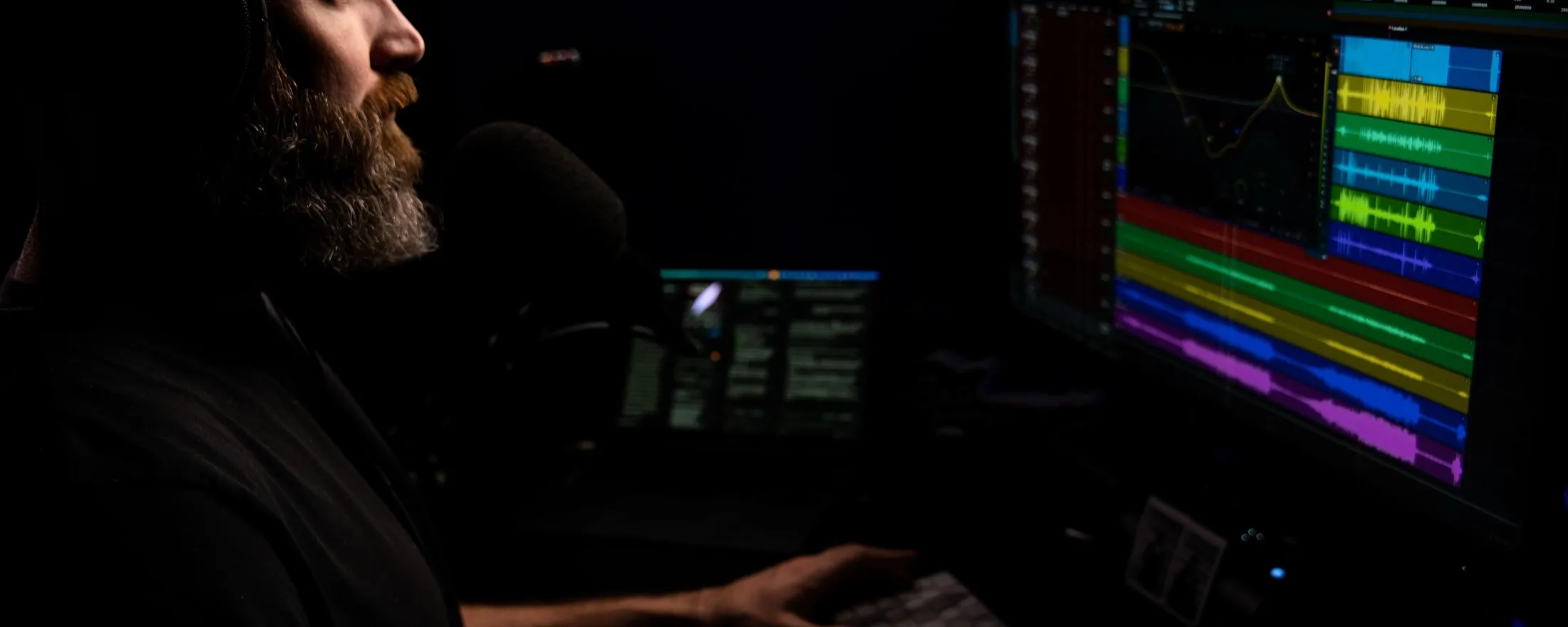
A real session: dropped in, prepped, and sent to Pro Tools.

Built for engineers who get handed multitracks. If sessions land in your inbox as ZIP folders full of Audio_14.wav, this page is for you.

macOS 14+ (Apple Silicon) · Intel Mac & Windows in beta · 30-day money-back guarantee

David Glenn, founder of The Mix Academy

Built by a mixer who knows where the time goes.

I'm David Glenn, founder of The Mix Academy and a multi-platinum mix engineer, 20+ years behind the console on records past 8 billion combined streams, for Dr. Tumi, Redimi2, Blanca, Christine D'Clario and Evan Craft. Teaching mixers since 2011. MIXPrep is the prep tool I built for my own sessions. Now it's yours.

Sound familiar?

You got into this to mix,
not to rename 120 files.

Every session starts the same way: a download link, a ZIP file, and a folder full of Audio_14.wav, bounce_v3_FINAL(2).wav, and tracks you have to solo just to figure out what they are.

Before you touch a single fader, you spend 60 to 90 minutes renaming, sorting, gain-staging, and organizing. Every track arrives at a wildly different level. You open your DAW already annoyed, still searching for the key, the tempo, and the problems hiding in the session.

MIXPrep gives you back the first 60 to 90 minutes of every mix.

Drop in a folder. Get clean track names, gain staging done your way, automatic key and tempo detection, and a complete session breakdown, before you open your DAW. Start mixing while the coffee is still hot.

See it for yourself

From a folder of chaos to a clean session.

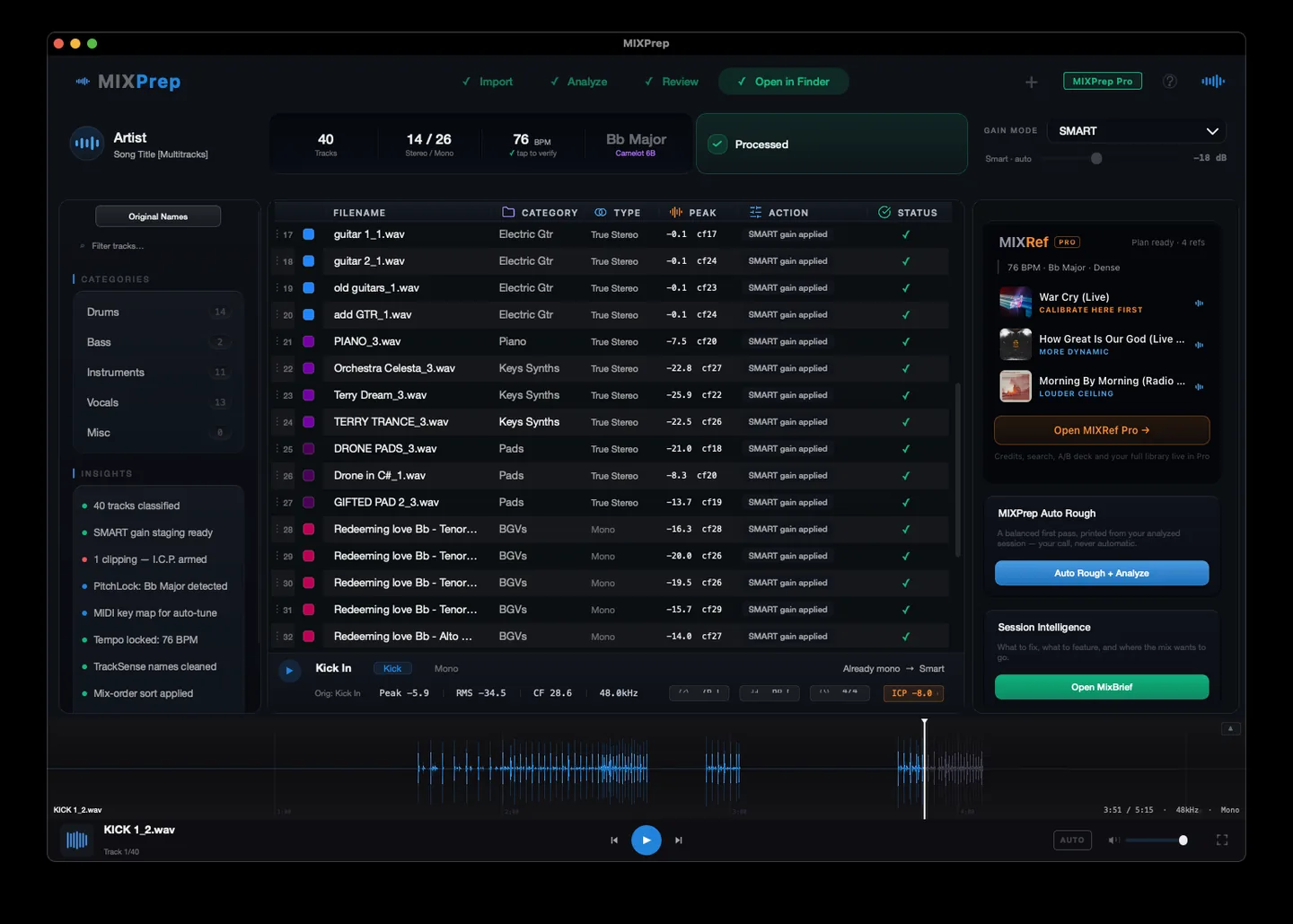
This is one screen, before and after MIXPrep. Drag the handle and watch the mess turn into a session you can actually work in.
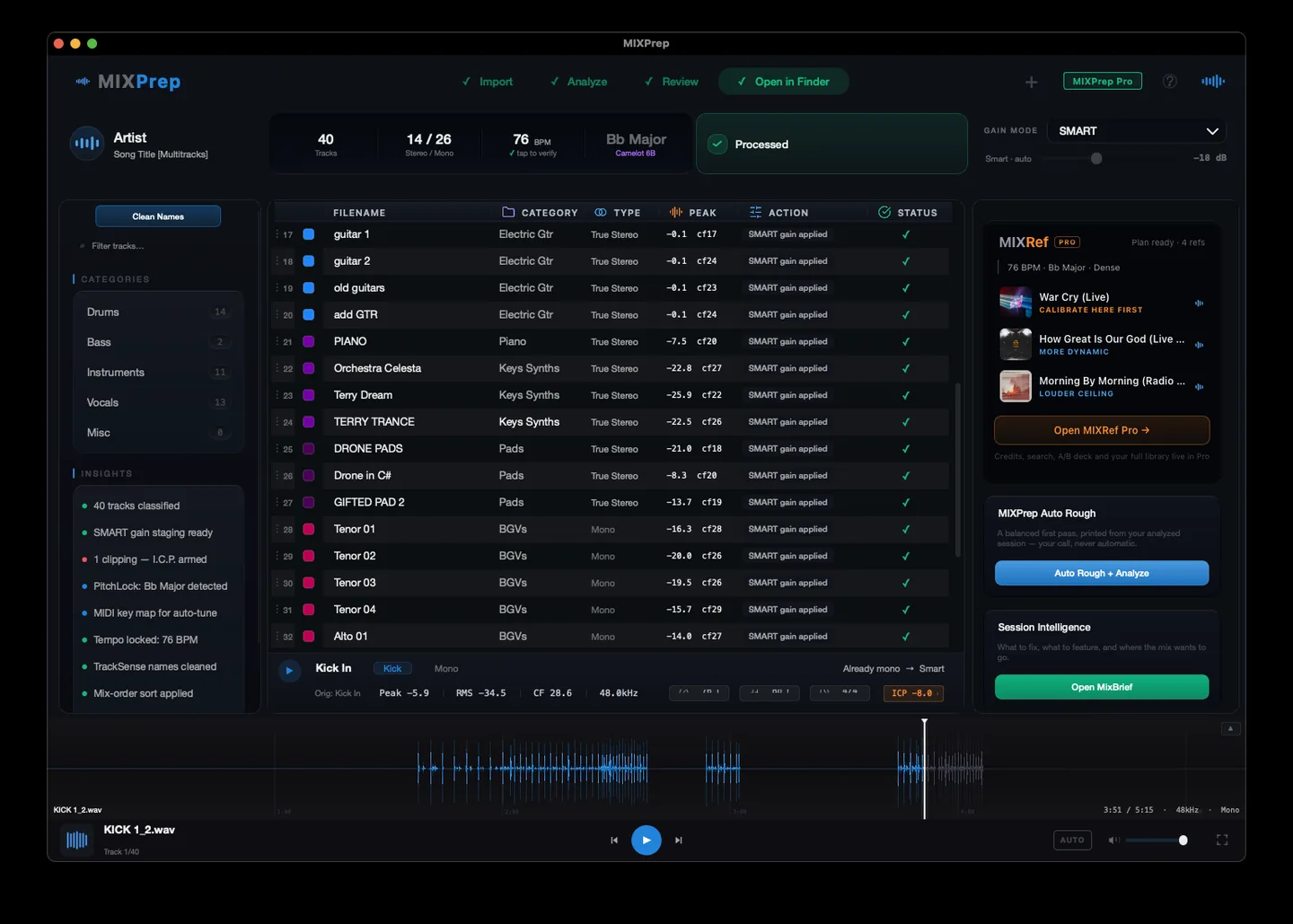
Clean, categorized tracks after MIXPrep TrackSense
Raw DAW filenames before MIXPrep TrackSense
BEFORE AFTER

Drag the handle, or click anywhere on the screenshot. That's TrackSense. And it's just the start of what MIXPrep handles before you open your DAW.

How It Works

Drop a folder. Get a mix-ready session.

No menus to learn. No setup. Here is the whole flow, start to finish. (The full walkthrough is playing up top.)

1

Drop a folder or zip onto MIXPrep.

Any folder of audio multitracks, or a zip file. WAV, AIFF, FLAC, MP3. Any sample rate, any bit depth.
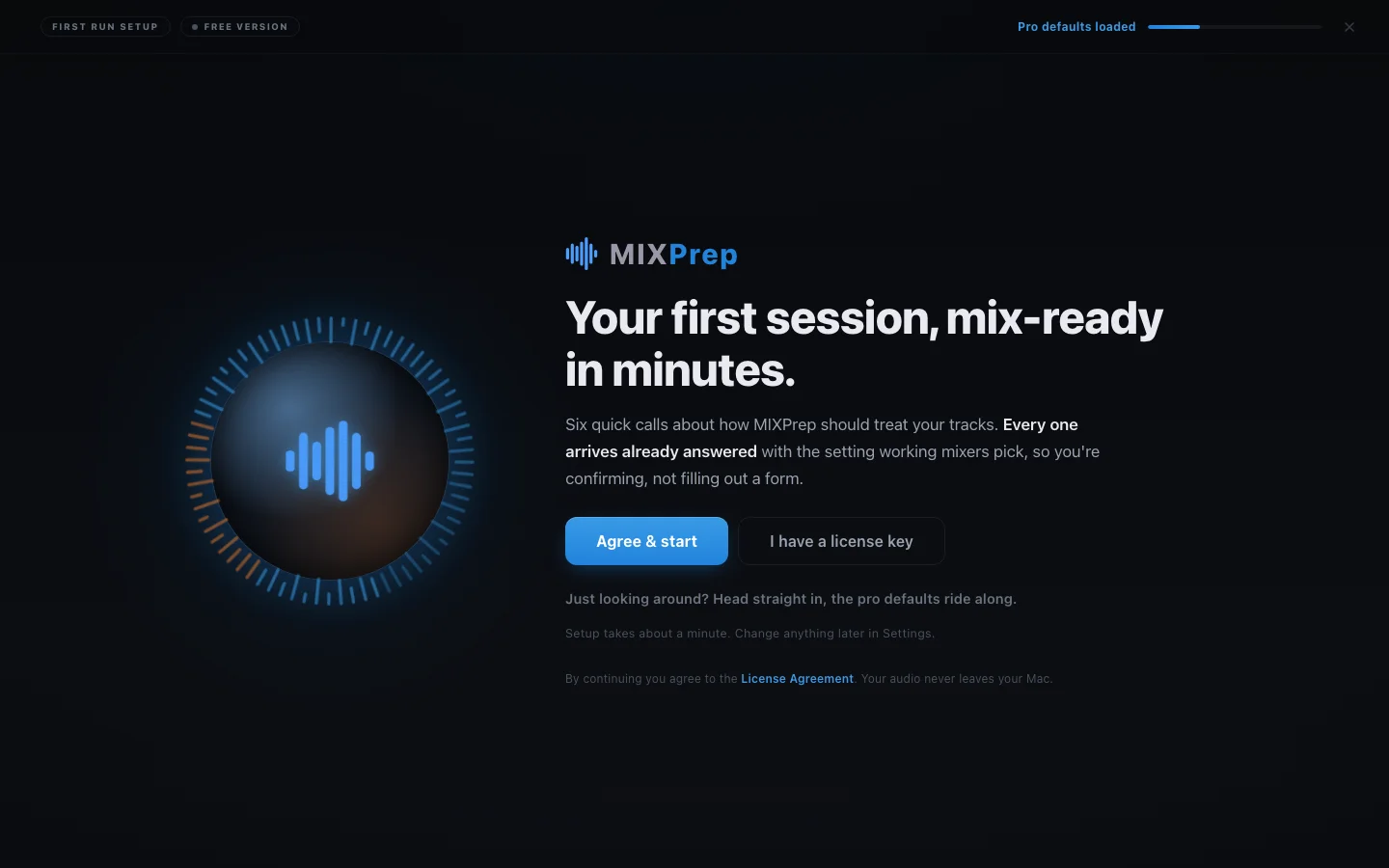
MIXPrep's new session screen: drop a folder of tracks to start, or start from the outcome you're after

Drop a folder and MIXPrep takes it from here.

2

MIXPrep listens, categorizes, and names what it can.

Vocals, kick, snare, room mics, pads, and 34 more categories. TrackSense reads both the filename and the audio itself, and turns names like "Lead_Vox_v3_FINAL.wav" into a clean "Lead Vox" instantly. Pure placeholders like "Audio_Track_14.wav" stay flagged with a NO NAME badge until you take a 2-second listen and label them. We won't make up a name we don't actually know.

3

Every track gets gain-staged to the right level for what it is.

Not one flat target for everything. Your kick gets different headroom than your room mic. Your vocal gets different headroom than your bass DI. Category-aware gain staging, calibrated from real sessions. Load a reference mix you love and MIXPrint captures its per-category balance as a reusable template.
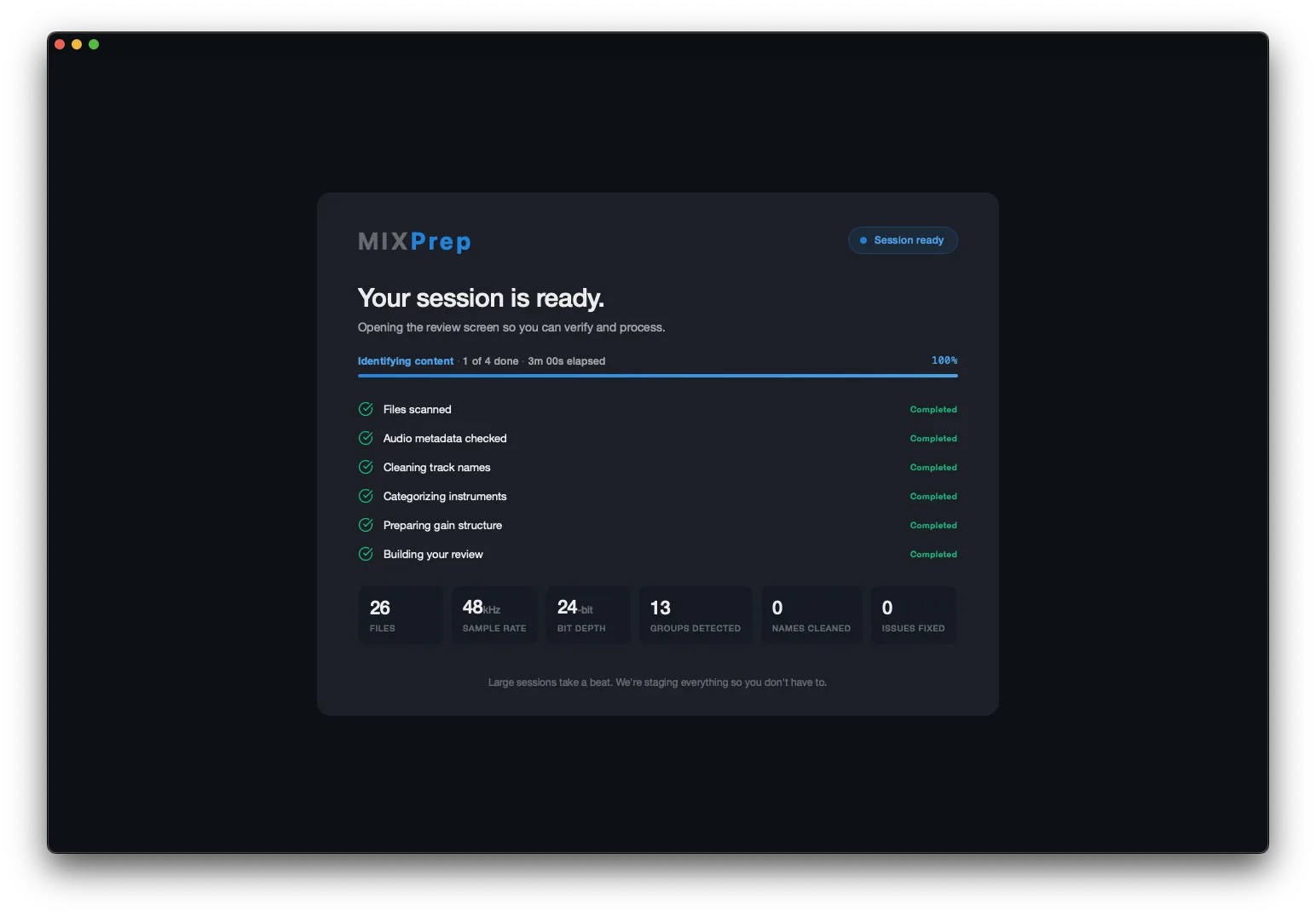
MIXPrep session-ready summary: files, sample rate, bit depth, groups, gain structure

Every stage handled automatically, gain structure included, before your review opens.

4

See your session before you open your DAW.

Key, tempo, time signature, and the full track count by category, detected automatically. You know exactly what you're walking into. (The full MIXBrief report, with mix priorities and an exportable checklist, is part of the Pro layer.)

Your multitracks go from a pile of mystery files to organized, gain-staged copies, with the key, tempo, and track breakdown in hand. In minutes instead of the first hour.

Match My Mix + Send to DAW · Pro

Song one is where you find the record.
Song two should not start from nothing.

No two songs on a record mix the same. That is the job, and it is the part worth your ears. But the scaffolding underneath is identical every single time: the same routing, the same track order, the same hard-won starting balance you already signed off on. That is the part you should never have to build twice.

The balance carries. The automation does not. Song two still gets its own rides, its own moves, its own life. You are just not starting it from an empty session. Pro Tools today; more DAWs are coming as we grow.

Send to DAW is the everyday move. Your prepped, named, gain-staged files land at the top of the session you already have open. No import dialog, no dragging, no naming anything twice.
Match My Mix is that with the record already in it. It reads the mix your client signed off on and stands song two up at that balance, so the session you open on a Tuesday morning already sounds like the record you are making.
Pro Tools today. beta More DAWs are in development for later this year. Both of these live in the Pro layer.
From Engineers Using It

Engineers are already prepping this way.

"I'm buying MixPrep at the Pro Founder level. Take my money, I'm not even looking for a discount."

Ben Rico · Audio engineer + producer

"I dropped a 90-track session in and had it organized and gain-staged before my coffee was done. This is the part of mixing I always dreaded, and now it's gone."

John S. · Mix Engineer, Nashville

"The category-aware gain staging alone is worth it. Most things land where they should before I even open the session. I start mixing instead of fighting levels."

Brett J. · Freelance Mixer, Worship + Pop

"It's honest. When it can't name a track, it tells you instead of guessing. That's the thing other tools got wrong, and it's why I trust this one with real sessions."

Adam B. · Recording + Mix Engineer, Rock

"It has been an absolute privilege to beta test the Intel version of MIXPrep and witness its evolution first-hand. The bugs are getting squashed, incredible new features are constantly dropping, and the brand-new GUI is both gorgeous and highly functional. It's an absolute game-changer for session prep!"

Jacki B. · Songwriter + Beta Tester

The Suite

MIXPrep does everything around the mix.
So all your time goes into the mix.

It started as the prep engine. It grew into a rack of instruments: prep, the send that builds your session for you, references, session intelligence, and MIXNotes. Here is what each one actually does.

0
genre and tradition profiles
0
verified mixer and producer credit records
0
steps in the MixPath mixing checklist
0
automated tests on the reference engine alone

Counted in the codebase. Not invented for this page.

MIXPrepGet mix-readyCore

TrackSense + SMART Gain: the first hour, handled.

Drop the folder. Every track recognized, named, and gain-staged for what it is, before your coffee cools.
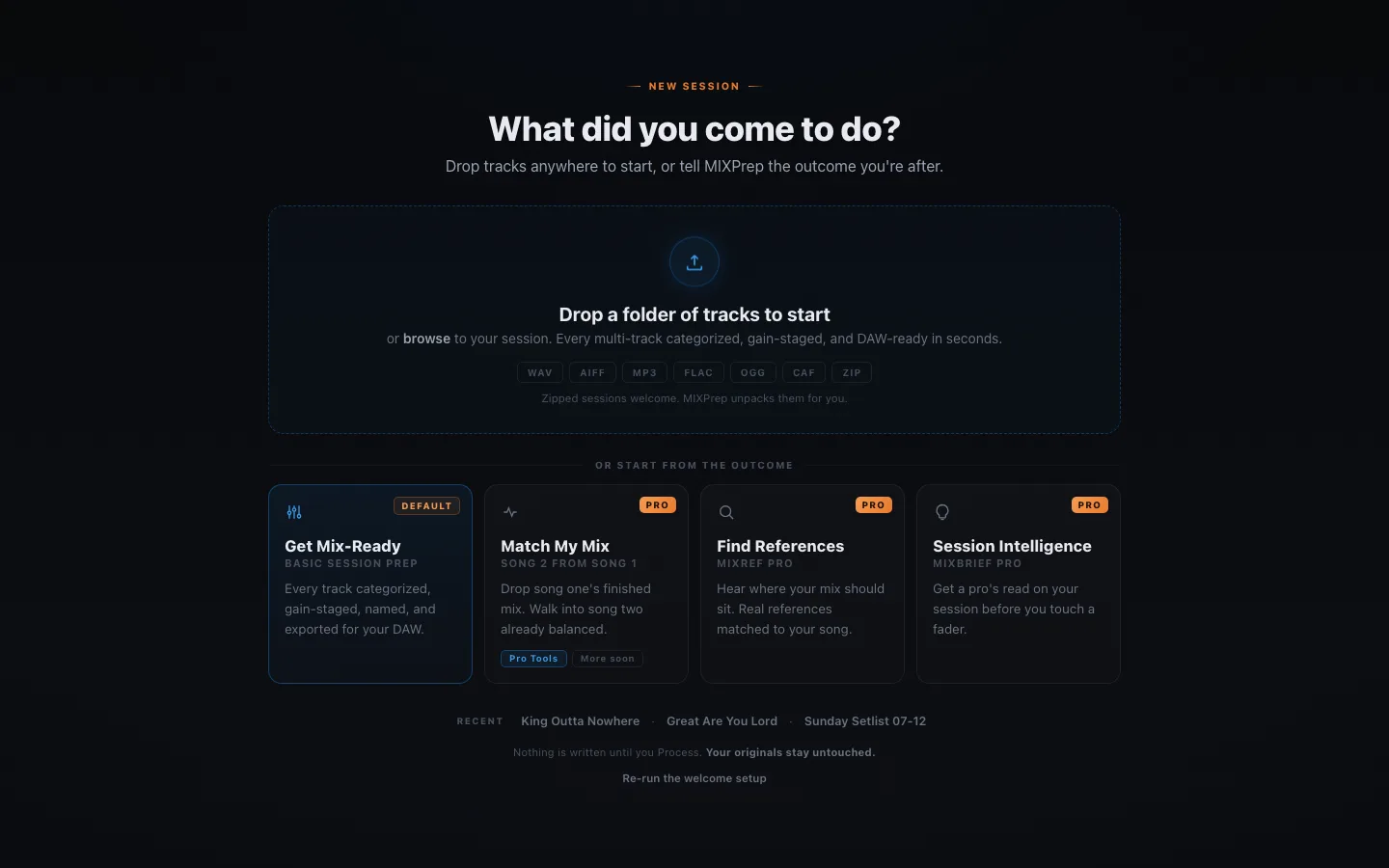
MIXPrep home: drop a folder of multitracks and the prep engine takes over
  • TrackSense reads the filename and the audio itself. 39 categories, and every correction trains it on your sessions specifically.
  • SMART Gain gives your kick, your vocal, and your room mic each the right headroom for what they are.
  • Your corrections stick. Every name you fix teaches the dictionary for the sessions after it.
  • Honest by design: placeholders like Audio_14.wav get a NO NAME badge, never a guess.
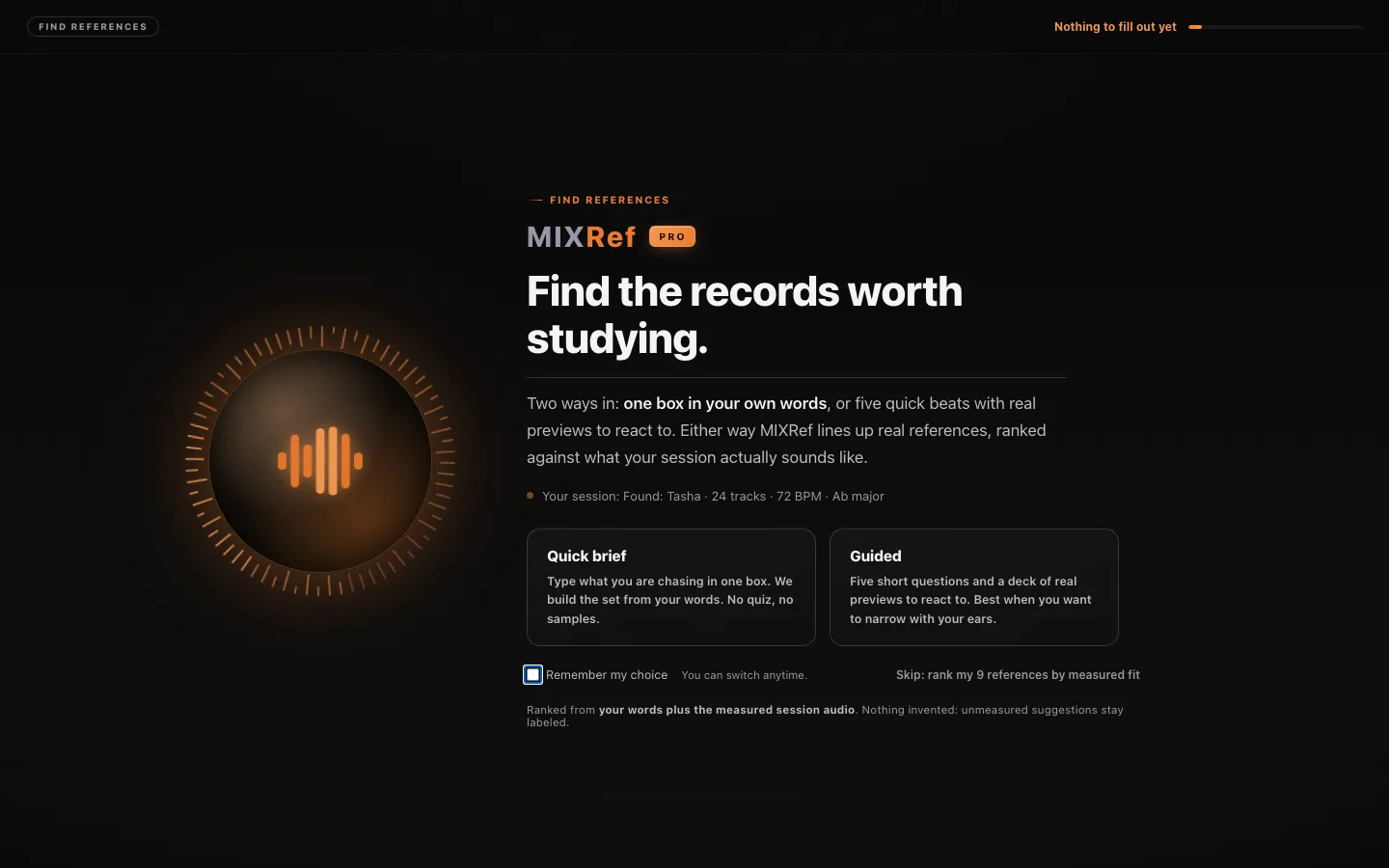
MIXRef ProFind your referencesProbeta

Reference tracks matched to your session. With receipts.

This is a real worship session ranked: real records, real artwork, a measured match score, and a plan for what each reference is here to teach you. It is structurally unable to invent a record, a credit, or an award.
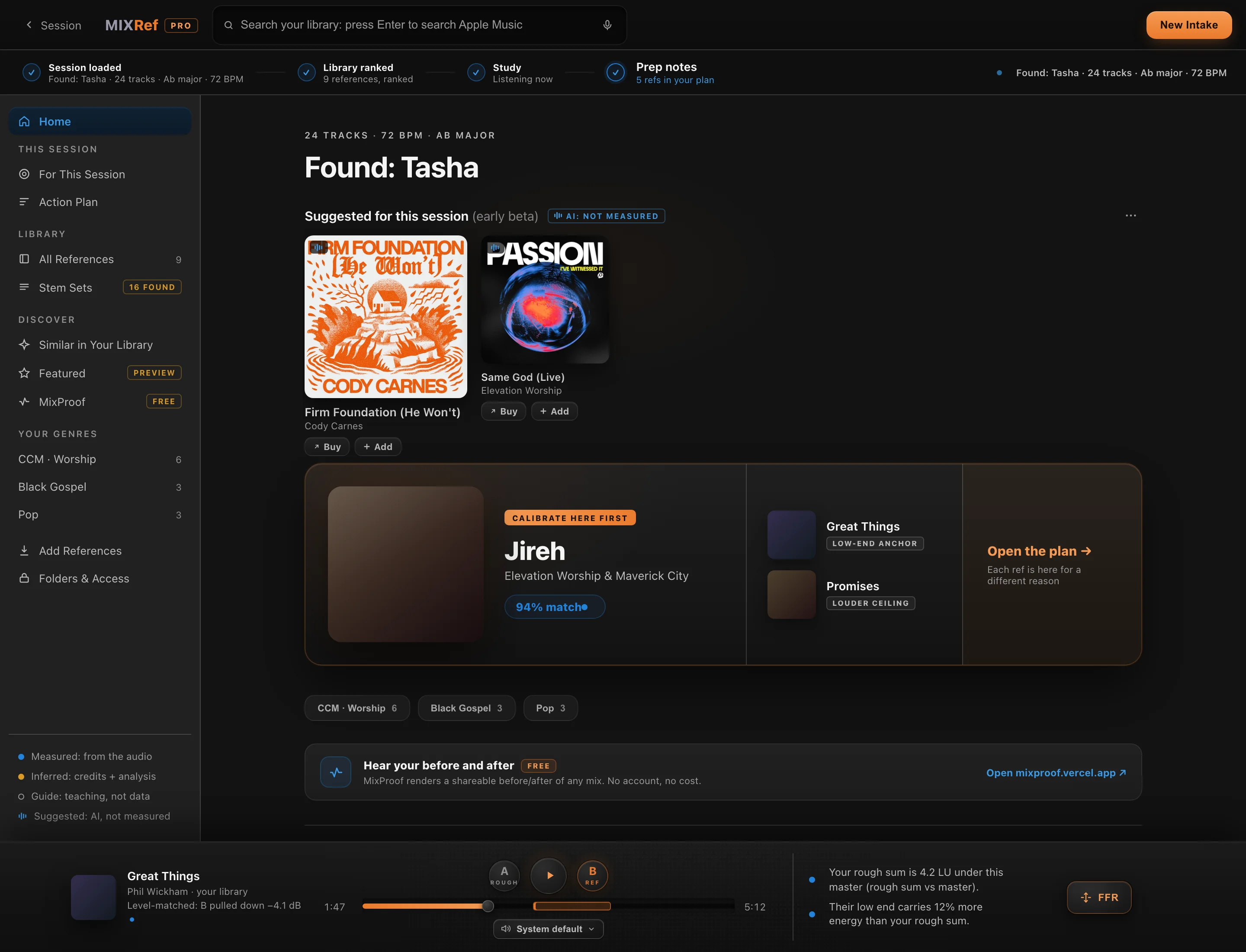
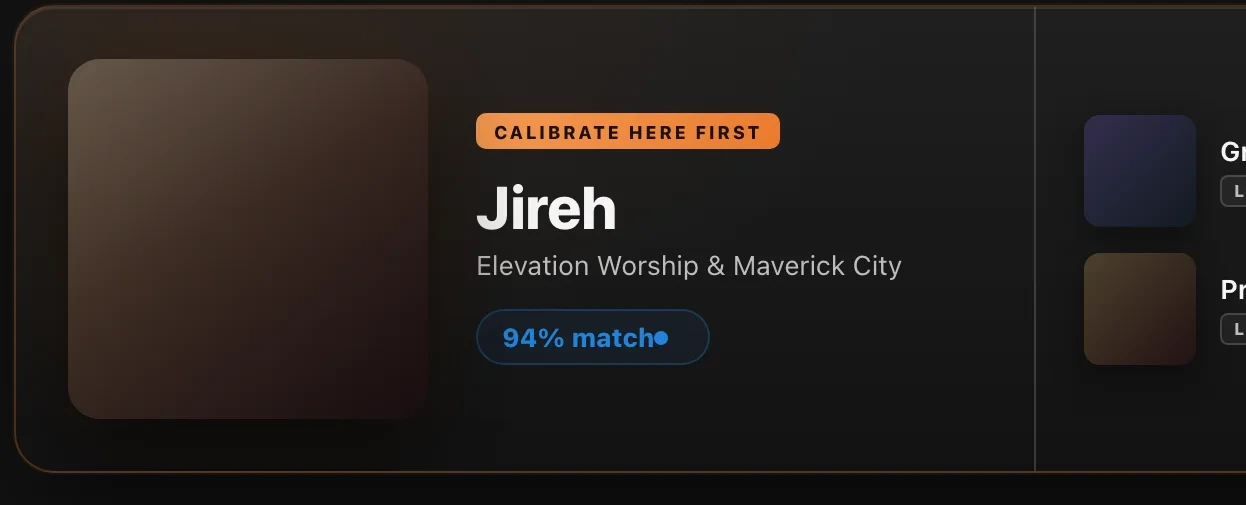
Calibrate here first: Jireh, Elevation Worship and Maverick City, 94 percent match, with low-end anchor and louder ceiling picks
It tells you where to start.One record to calibrate on, with a measured match score. Each ref after that is here for a different reason: a low-end anchor, a louder ceiling.
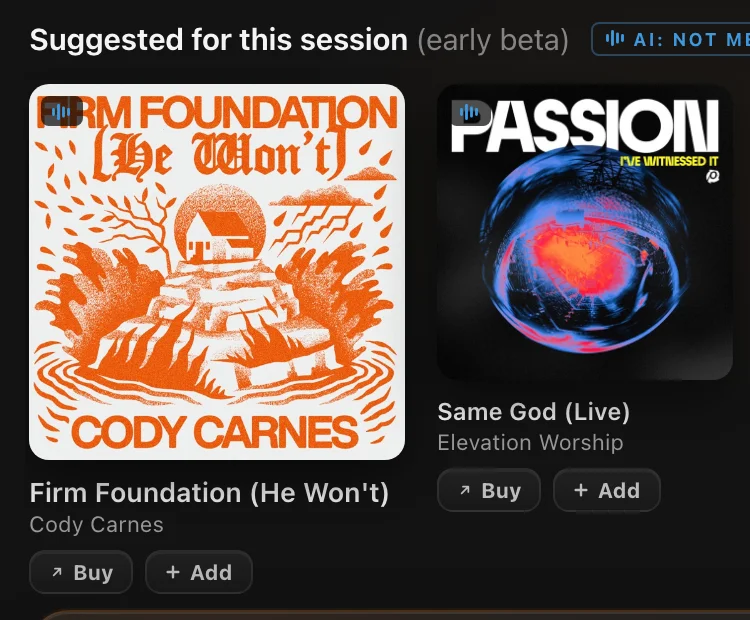
Suggested records with real album artwork and Buy and Add buttons
Real records, honestly labeled.Suggestions wear "AI: not measured" until the audio is. Every card is a real release with a Buy button, never an invented title.
The reference deck player: Great Things by Phil Wickham, level-matched, B pulled down 4.1 dB, with rough-versus-master honesty numbers
Level-matched, so the louder one can't win the argument.A/B your rough against the reference with the level difference measured and pulled down, and the honest numbers on screen: "your rough sum is 4.2 LU under this master."

Behind every card: 688 verified credit records (a mixer credit is only badged confirmed when two independent sources agree) and 84 genre profiles that keep Black Gospel, African gospel, and CCM in their own canons. Default mode uses metadata and analysis only; your audio never leaves your machine unless you switch on Enhanced Mode yourself. Part of the Pro layer.

MIXBriefSession intelligenceProbeta

Your session intelligence report, before you open the DAW.

A senior engineer's read of the whole session, triaged: what's actually wrong, what's your call, and what MIXPrep already handled. It will tell you "not yet" when that's the truth.
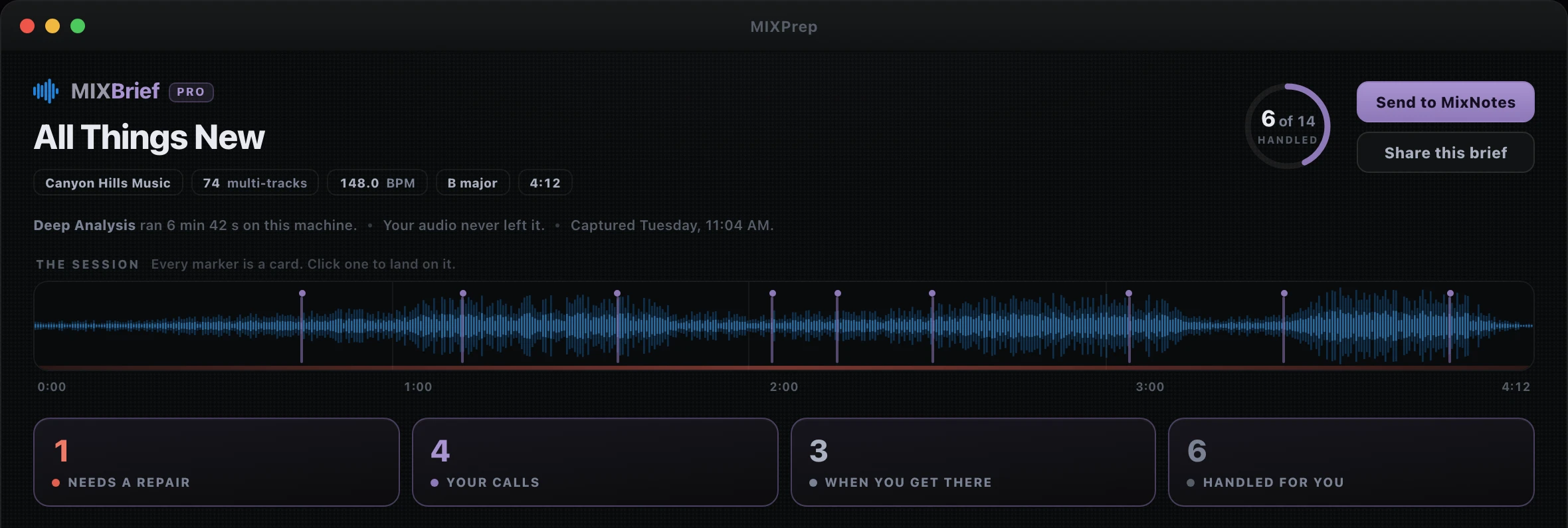
MIXBrief Pro command center: All Things New, 74 tracks, 148 BPM, B major — a waveform session ruler where every marker is a card, and the session triaged: 1 needs a repair, 4 your calls, 3 when you get there, 6 handled for you
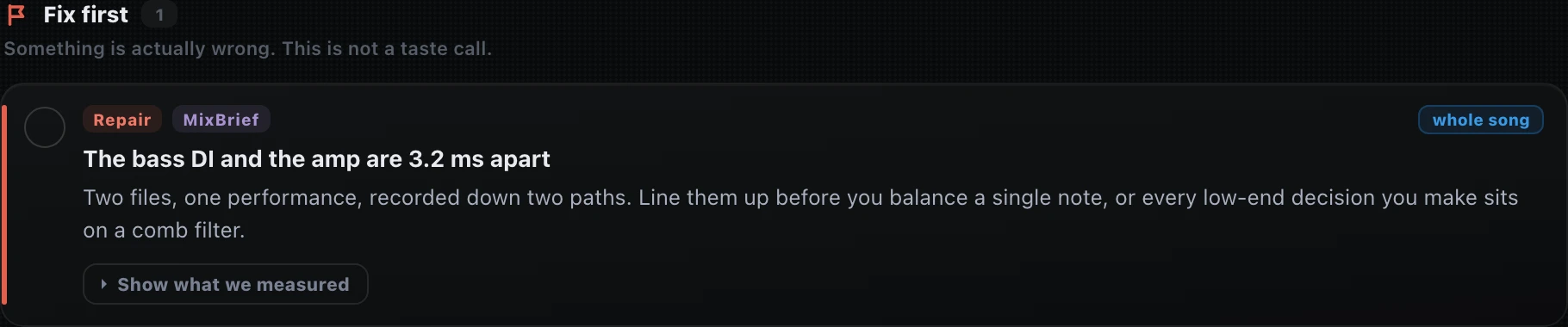
Fix first: the one real red flag — the bass DI and the amp are 3.2 ms apart — with Show what we measured one click below
One thing is actually wrong. It leads.Fix first holds the real red flag, with what was measured one click away. Not a taste call.
A MIXNotes-style card: Clean bass gaps, timestamped 1:38, 2:04 and 3:30, with the MIXBrief evidence strip underneath
Findings land as MIXNotes cards.Timestamps on the title, the evidence underneath: found 3 in this session, at 1:38, 2:04 and 3:30. Your calls stay yours.
The send strip: five new notes onto All Things New, two attached to steps already on the list, nothing duplicated — Send to MIXNotes or Copy for your assistant
One send, nothing duplicated.New notes land on the song, findings you already track attach to their steps. Or copy the whole brief for your assistant.
"I'm really impressed with the Session Intel. It goes into detail with incredible precision, almost like looking through a magnifying glass. Being able to export it straight to Apple Notes as a checklist is just brilliant."Ricardo R. · Mix Engineer, Brazil

Part of the Pro layer.

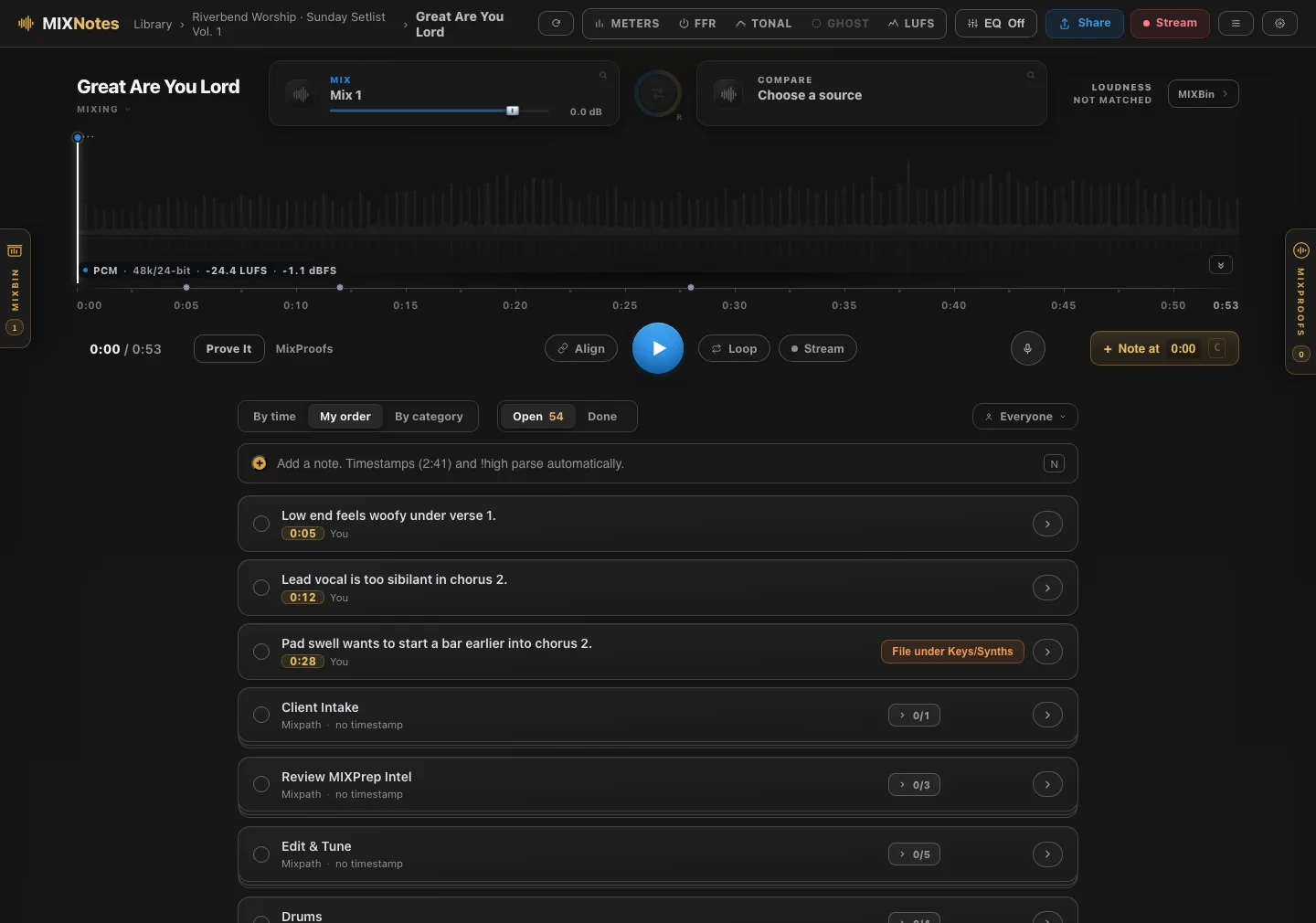
MIXNotesKeep the notesPro2.1

Your notes, living on the playhead.

My notes lived in about five different places. One app for client mixes, another for the critiques I write my students in the Control Room, something else for the to-do side of it, and a folder of voice memos nobody could find. Nothing talked to anything else. So I stopped juggling apps and built one place where all of it lives, made for the way mixers actually work.

And because it was built for mixing, a note lands on the playhead. "Low end feels woofy under verse 1" lives at 0:05 until you fix it. No loading a rough into Pro Tools just to remember what you heard on the drive home.
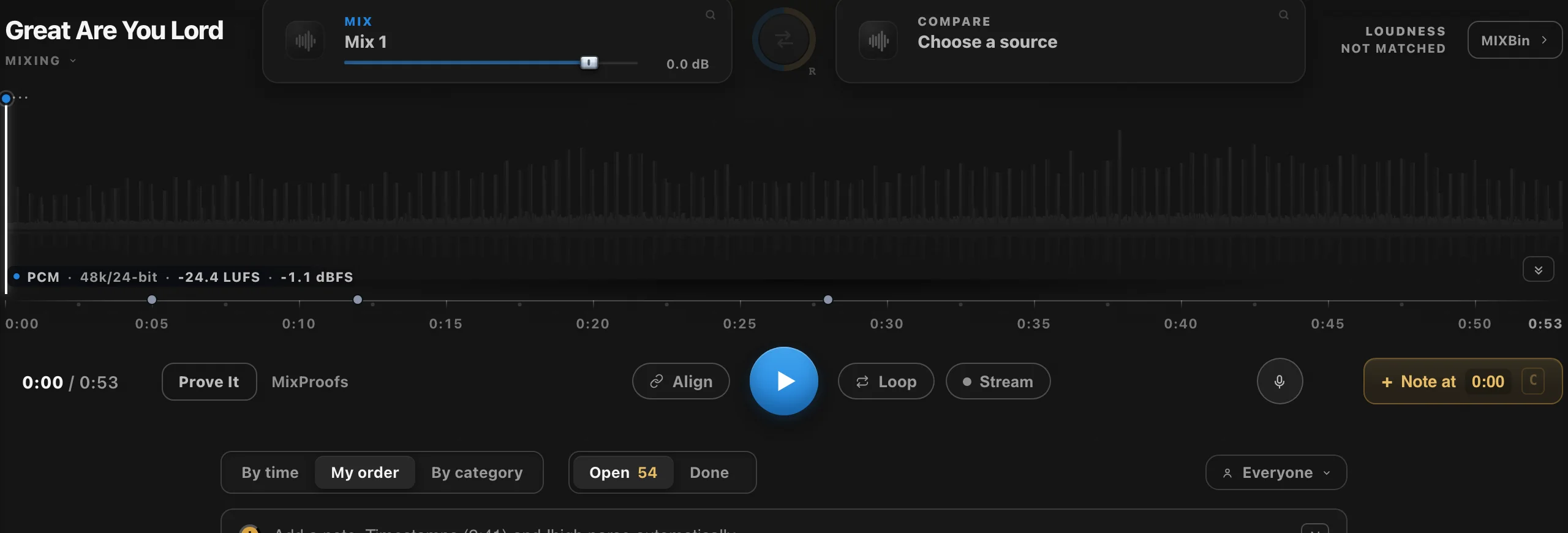
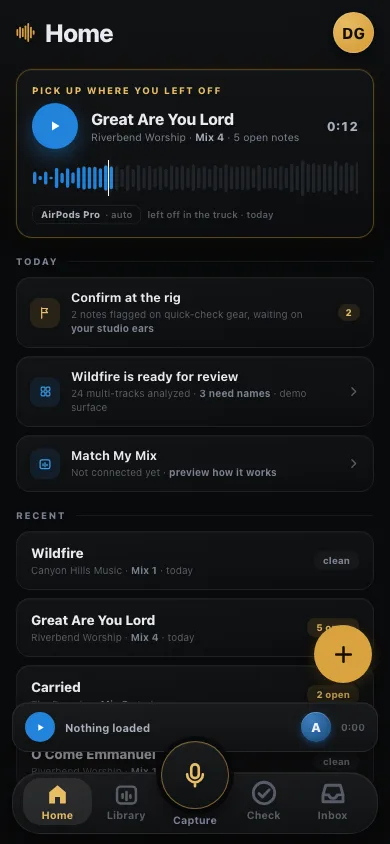
The MIXNotes phone companion, still in developmentin development
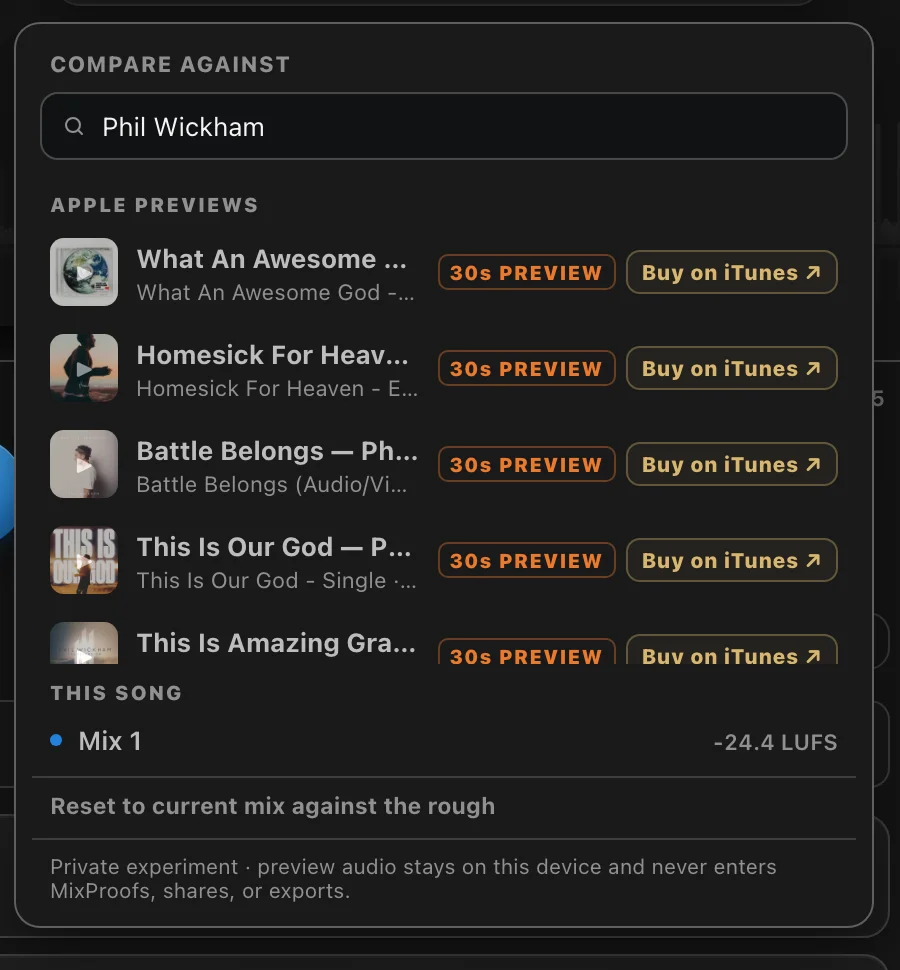
MIXNotes Apple Music picker: real Phil Wickham records with artwork, 30-second previews and Buy on iTunes
Reference without leaving the session.Search Apple Music from inside the note, pull the record you are chasing, and A/B against it level-matched. Real releases with a Buy button, never an invented title.
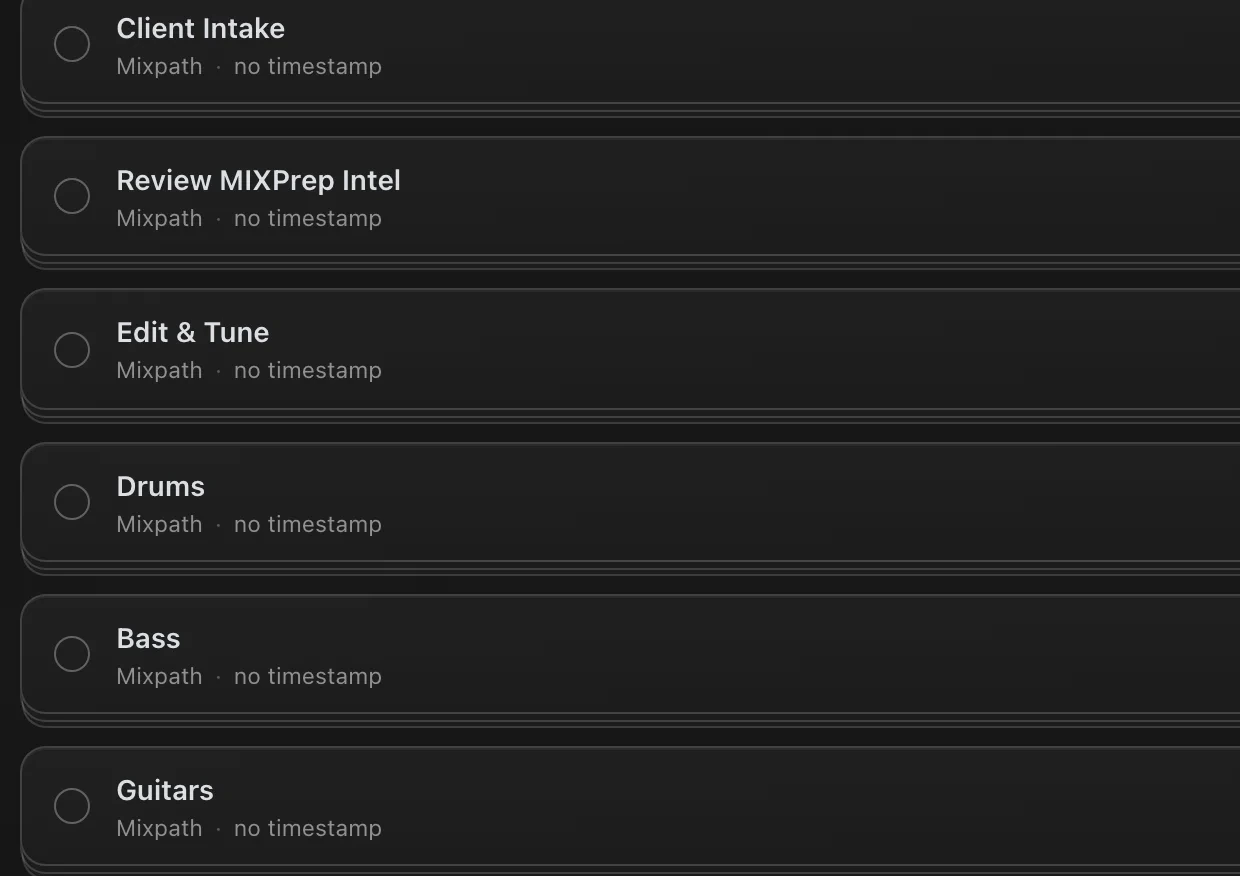
MixPath phases seeded into a session: Client Intake, Review MIXPrep Intel, Edit and Tune, Drums, Bass, Guitars
A checklist that lives in the song.Pull the MixPath checklist into any session, work it down, close steps off as the mix gets there. Skip whatever your session does not have.

Voice memos transcribe on your machine, offline, and "Play what you said" keeps the take. Note dots mirror Pro Tools' real 69-colour palette exactly, with custom DAW palettes coming. in development client text in any language splitting, translating and filing itself, and a phone companion for capture anywhere.
MIXNotes ships with the free 2.1 update, Mac first. Included in the Pro layer, at today's Pro price.

Session Intelligence

Key, tempo, time signature, detected automatically

From the audio itself. Key changes included. No metadata guessing, no manual BPM tapping.

MIDI Key Map

Auto-Tune and Melodyne setup in one click

Export a MIDI key map from the detected key and key changes. Load it into any pitch tool. Skip the scale setup.

Low-End Report

See sub-rumble before your EQ does

MIXPrep measures where your kick, bass and low synths are fighting each other for the same frequencies, so you know the clash before you open an EQ.

Track Translator

International sessions? Handled.

170+ audio terms in 15+ languages. Track names from anywhere in the world come out readable.

Privacy-First

Your audio never leaves your machine

Core processing is 100% local, and MIXPrep works on organized copies, never your originals. For NDA sessions, stay in default mode and you're fully air-gapped.

Make It Yours

Your track order, your colors, your defaults

Custom category order and colors, processing and gain targets, export and Send to DAW defaults. Every session comes out the way you work.

MIXNotes Share · in development

Send the mix. Get notes back
with the timestamps already on them.

You know the email. "Sounds great, maybe the vocal in the second chorus, also that thing around two minutes." Then you sit there scrubbing, trying to find what they meant. Share sends your client a page instead of a file.
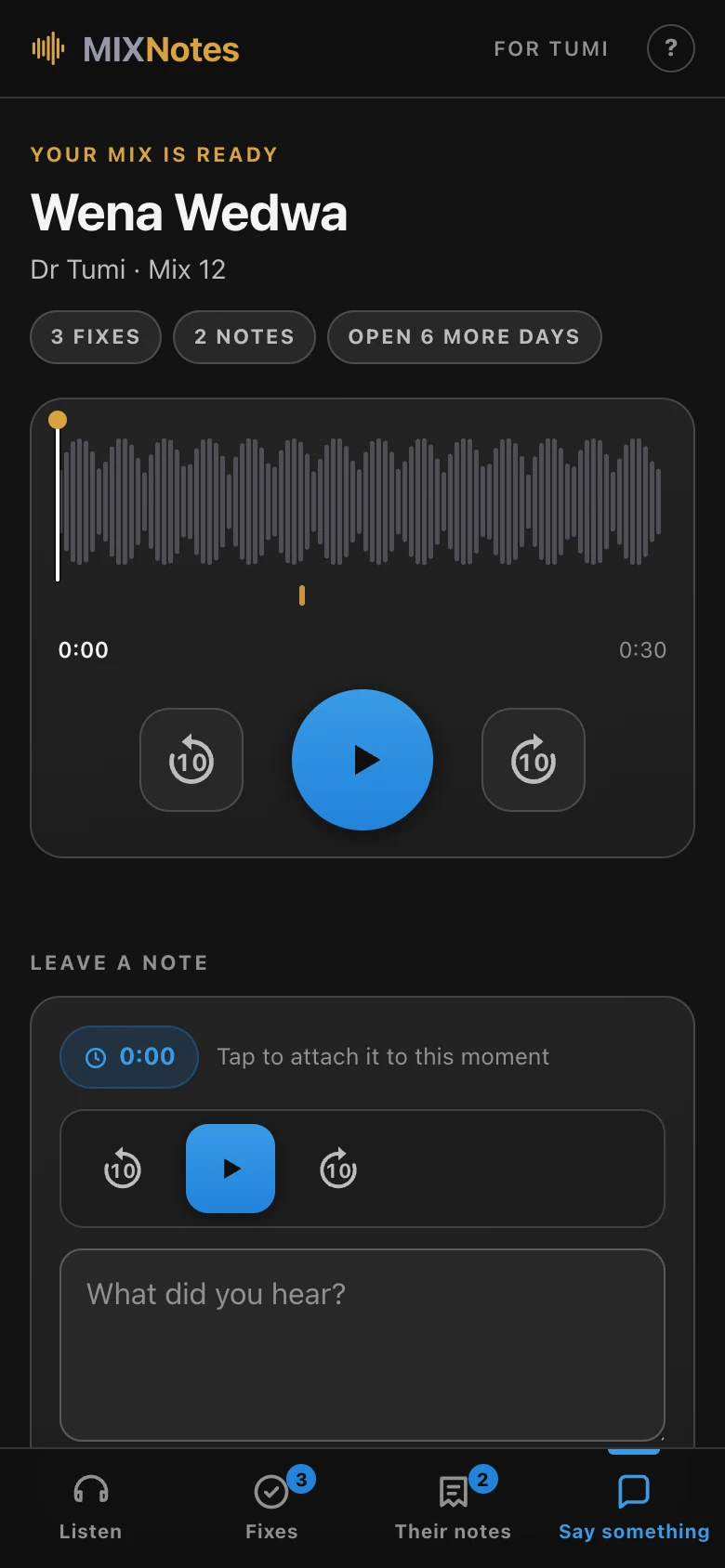
Straight with you: the service is live and I am using it on real client work, but it is still behind a beta gate and is not switched on for everyone yet. It arrives for Pro after MIXNotes lands. The screen above is a real share page for a real mix, not a mockup.

"Why am I still spending the first hour of every mix doing work that doesn't require my ears?"The question that started MIXPrep. David Glenn · multi-platinum mix engineer · mixing for 20+ years

The road here

A course in 2011. A working tool in 2026.

Not a product that appeared out of nowhere with a launch video. Here is the actual path, and where it goes next.
2011
The Mix Prep Series
My very first course. Gain staging and session organization, taught not shipped.
The years after
A private utility
An ugly little tool I built for my own sessions. Nobody was ever meant to see it.
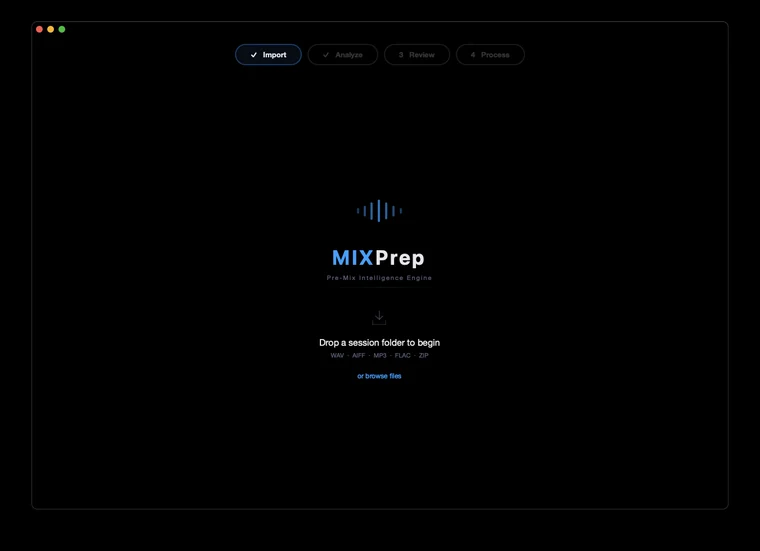
MIXPrep in April 2026: the Pre-Mix Intelligence Engine launch screen, four steps and a drop zone
March 2026
The rebuild starts
The old tool stopped opening. I started again from nothing, properly this time.
May 2026
First real releases
TrackSense and SMART Gain in strangers' hands for the first time.
June 2026
Shipping to customers
Prep, Clean Names and Send to DAW doing real work on real records.
MIXPrep today: the home screen you drop a folder onto
August 2026
It became a suite
MIXRef and MIXBrief joined the prep engine. You are looking at this one.

3,400+ commits since the first line of the rebuild. Most of them at night, after the sessions were done.

Straight talk

Where MIXPrep is right now.

I'd rather tell you exactly what's solid and what's still cooking than pretend it's all finished. Engineers can smell vaporware. Here's the honest map.

Rock-solid, every day

TrackSense categorization, Clean Names, SMART Gain staging, the full prep and process, and Send to DAW. This is the core, and it does the heavy lifting on real sessions right now.

In beta, working and getting sharper weekly

MIXPrint, MIXRef Pro, MIXBrief Pro, and the Send to DAW live inject. They work, and they're good. They're also improving fast, and your feedback shapes where they go next.

Landing next: the 2.1 update

MIXNotes ships with 2.1 on Mac first. Founders on the Pro layer get it the day it lands, at today's price.

In development, Founders get it first

PhaseSync (automatic phase alignment for multi-mic'd kits), MIXNotes client share links, and the Reaper live inject.

You're not buying a frozen product. You're locking founder pricing on a tool that improves constantly, with a direct line to me when something's off. macOS 14+ on Apple Silicon is the production build. Intel Mac and Windows are in beta.
Works with your DAW

However you mix, MIXPrep meets you there.

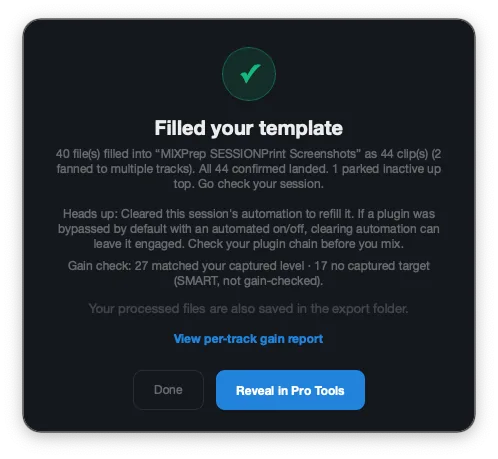
MIXPrep filled a Pro Tools template: 44 clips landed, ready to reveal
Send to DAW · live inject

Straight into your open template. No importing.

Your prepped, gain-staged session gets built directly into the template you already mix in. You watch the clips land.
Pro Tools beta
Reaper coming
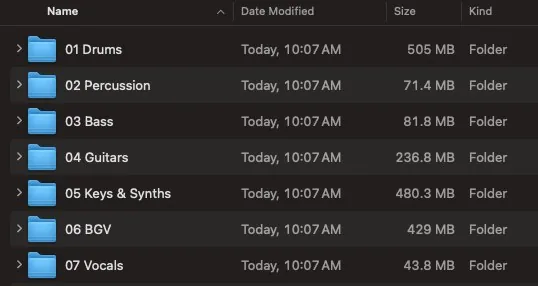
MIXPrep's organized output folders: 01 Drums, 02 Percussion, 03 Bass, and more
Session export · ready today

A clean, numbered folder any DAW will take.

Named, organized, gain-staged copies, plus a session file your DAW imports. Drop it in and start mixing.

Logic Pro · Cubase · Studio One · Reaper (native)

Export uses AAF for Logic, Cubase, and Studio One, plus Reaper's own native session format. Live inject for Reaper is on the way. Pro Tools live inject is in beta now.

The Rundown

What you get, in plain English.

The whole stack, row by row. No fine print.

MIXPrep Core$97 · one-time
MIXPrep Pro$247 · one-time
Best valuePro + Control Roomfrom $297 · one-time
The prep engine · in the order it runs
Drop in the folderA folder or a .zip of multitracks. That’s the whole setup.
TrackSenseEvery track identified and categorized. No more guessing what audio_14_01 is.
Clean NamesRenamed your way, every session. Like you named them yourself.
SMART GainCategory-aware gain staging. You start from a real balance, not from zero.
The session breakdownKey, tempo, time signature, and the full track count, before you open your DAW.
The Pro rack · everything in Core, plus
MIXRef ProReference records picked for your song, inside the session. Hear the gap, then close it.
·
MIXBriefThe session intelligence report. You open with a plan, not a guess.
·
MIXNotesArriving with 2.1. Feedback lands on the playhead, not in your texts.
·
Send to DAWLive inject into Pro Tools (beta); clean export for any DAW. Nobody rebuilds sessions by hand.
·
Match My Mix + MIXPrintSong one’s approved balance stands song two up (beta). The record carries.
·
The Control Room · the membership
The course libraryEvery course, indexed and rewatchable. The craft, not just the tool.
·
·
Live sessions + replaysReal records mixed live. Ask while the faders move.
·
·
Templates + session filesThe actual sessions behind the teaching. Mix the records you just heard.
·
·
The roomEngineers working your problems, and I’m in it with you. You stop mixing alone.
·
·
Get MIXPrep · Founders window closes August 31

Own it once, before it becomes a subscription.

Through August 31 you own MIXPrep outright for a single payment, updates included, no monthly bill ever. On September 1 the Pro suite moves to subscription pricing for new customers. What you buy today stays yours, at today's price, for good.

--
Days
--
Hours
--
Minutes
--
Seconds

Do the math an engineer does: 60 to 90 minutes back per session. Mix twice a week and that's 100+ hours a year. Either tier pays for itself inside the first week of real sessions.

MIXPrep Core
The prep engine
$97 one-time

Everything that runs on your machine. Drop a folder, get a prepped session. That simple.

  • TrackSense 39-category recognition, reads the filename and the audio
  • SMART Gain category-aware gain staging, the right headroom for each track type
  • Clean Names, MIDI Key Map, automatic key / tempo / time-signature detection
  • Unlimited tracks, unlimited sessions, works with any DAW
  • Founders price locked for life, free updates included
Get Core $97
Most powerful MIXPrep Pro
Core + the full suite
$247 one-time

Everything in Core, plus all four instruments: references, session intelligence, MIXNotes, and the feature that drops your session straight into Pro Tools.

  • Everything in Core
  • MIXRef Pro beta matched reference tracks with verified credits, 30-second side-by-side previews, one click to Apple Music and the iTunes Store
  • MIXBrief beta the full Session Intelligence Report, exportable to Apple Notes or PDF
  • MIXNotes new · 2.1 MIXNotes: voice notes transcribed on your machine, client feedback in any language, my own mixing method built in
  • Send to DAW beta live inject: builds your prepped, gain-staged session straight into your open Pro Tools template
  • Match My Mix beta and MIXPrint: read an approved mix and start the next song of the record already at that balance
  • PhaseSync in development automatic phase alignment for multi-mic kits, the moment it launches
Get Pro $247
Go deeper

Want me in it with you? Add the Control Room.

The Control Room is my membership: the full course library, live mixing sessions and replays, and a community of engineers leveling up together. On its own it runs $297 a year. During the founders window, two bundles fold it in with Pro:

Pro + Control Room, 1 Year
$297one-time

Everything in Pro, plus 12 months of every course, live session, and replay. Includes the private beta team, early builds, and the monthly Founders call with David.

Get Pro + a year of Control Room
Pro + Control Room, Lifetime
$497one-time

Everything in Pro, plus permanent Control Room access. Every course, every live session, every future course. No renewal, no expiration, ever.

Get Pro + Control Room for life

The math is not subtle: the Control Room alone is $297 a year. The lifetime bundle is $497 once, with the entire Pro suite included.

Founding Advisor · 10 seats, application only · $1,497 once. Lifetime access to every TMA tool we ever ship, a private monthly session with David, a 90-minute 1-on-1 mix critique, a 5x-weighted vote on the roadmap, and your name in the app credits. This one is by application, not checkout: I want to know who is in the room. Tell me what you're working on at david@themixacademy.com and I'll come back to you personally.

Apple Pay · Google Pay · Card · Klarna · Afterpay · PayPal
Secure checkout via Kajabi. Pick any payment method.

30-day money-back guarantee. No questions, no hoops.

Already bought in at a lower tier and want to move up? Email support@themixacademy.com and we'll credit what you paid.

The Control Room

MIXPrep preps the session.
The Control Room is where I help you finish the mix.

My membership, and I'm in it with you.

Watch me mix real records live, ask questions while the faders move, and learn the craft from the full course library. MIXPrep handles the first hour of the session. This is for everything after.
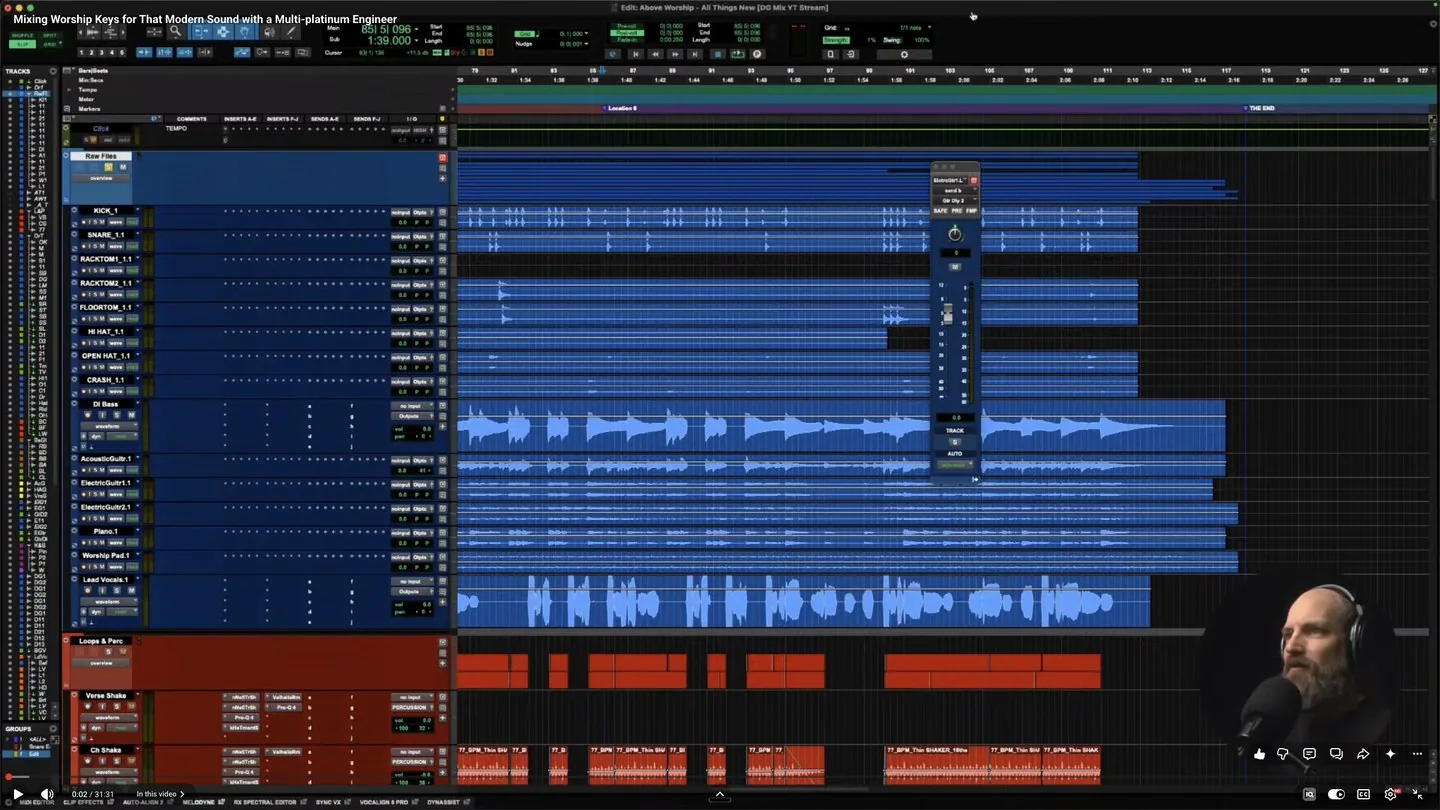
David Glenn mixing live in Pro Tools during a Control Room session
The full course library. Every course I have ever made, start to finish.
Live sessions with me. Watch real records get mixed and ask questions while the faders move.
Every replay. Miss one and it is waiting for you, indexed and rewatchable.
A room full of engineers. People working the same problems you are, not a comment section.
Every future course, free while you are in. The library keeps growing and you keep getting it.
Templates and session files. The actual sessions behind the teaching, not slides about them.
Doug Weier

Asked on the Made It In Music podcast to name one YouTube channel for mixing

“There’s this guy, David Glenn. His stuff sounds really good. He’s one guy where it’s like, oh, this sounds good immediately.”

Doug Weier. 3x Grammy nominated. 21 Billboard #1 singles.
Chris Tomlin, MercyMe, Walker Hayes. · hear the episode

Lucas, Produce Perform

After a Mixing Discipleship session

“It was night and day different. Night and day. It was huge.”

Lucas. Produce Perform, worship music production.
7,800 subscribers.

Hear the difference.

BEFORE · client raw files AFTER · mixed/mastered by David Glenn

Eight records from my chair. Every card plays the flip.

Then get your hands on the records.

Eight finished mixes from my chair. Records like these are what members open in the Control Room, multitracks, templates, and sessions included, and mix start to finish.

This is the standard the room teaches. The full course library, the live sessions, and the templates and session files behind the teaching all come with membership.

Two ways to get it, both cheaper than the membership alone.

On its own the Control Room is $297 a year. During the founders window, both of these include the entire MIXPrep Pro suite on top, for one payment.

MIXPrep Pro
+ Control Room, 1 year
$297one-time
  • Everything in MIXPrep Pro, yours permanently
  • 12 months of every course, live session and replay
  • The private beta team and early builds
  • The monthly Founders call with me
Get Pro + a year of Control Room

The same price as the membership on its own. The Pro suite comes along for nothing.

MIXPrep Pro
+ Control Room, lifetime
$497one-time
  • Everything in MIXPrep Pro, yours permanently
  • Permanent Control Room access. No renewal, ever
  • Every course, every live session, every future course
  • The private beta team, early builds, and the Founders call
Get Pro + Control Room for life

Cheaper than two years of the membership, and it never expires.

Just want the app? MIXPrep Core is $97 and Pro is $247, one-time, no membership required. The Control Room is here whenever you want me alongside you.

What it's like working with David

Engineers who got in the room with me.

"David Glenn is one of the most talented mix engineers I've worked with. His ability to teach what he does and break it down for others is a rare gift. If you want to get better at mixing, this is where you go."
John JamesJohn James · Former lead singer of Newsboys, multi-platinum recording artist

"I have a degree from Full Sail, and David Glenn's training has given me more workflow clarity and practical mixing skill than my entire formal education."
Tom CampTom Camp · Full Sail graduate and mix engineer

"I've made 20 times what I invested in The Mix Academy back in mixing income. The ROI isn't theoretical. It shows up in real client work."

Scott OsterlohScott Osterloh · Professional mix engineer

"Your content helped me change my life. My mixing greatly improved while getting faster and more consistent, and that edge helped me beat nearly 300 applicants for my full-time game audio job."

NZNick Zwirlein · Game audio composer

"I'm able to put food on the table for my family and keep a roof over our heads because of you and your tutorials."

GYGybriel · Gospel / keys mixer

"I was almost going to quit mixing. Then I saw David's tool for arranging tracks, told myself I'd try one more time, and subscribed."

DMDanny Miller · Control Room member

"All your programs have consistently helped me take my mixes to the next level. Customer for life!"

SLSteve Lambiase · Repeat customer

"I love your courses. They're very informative and have confirmed many of my longtime techniques. I've been mixing and mastering for over 40 years."

EAErnest Allen · Engineer, 40+ years

"David's template + tutorial was insane. The way he explains things is second to none. My confidence shot up immediately."

KTKevin T. · Engineer / producer

Who This Is For

If you open session folders for a living, this is for you.

Mix engineers doing 2+ sessions a week who are tired of burning prep time
Freelance mixers juggling sessions from different artists, producers, and studios, where every folder is a different kind of chaos
Producers who mix their own work and want to start from an organized, gain-staged foundation
Engineers working in any genre, hip-hop, R&B, rock, country, pop, worship, electronic, Latin, metal, jazz. If it comes as a folder of multitracks, MIXPrep handles it.
Anyone who's ever opened a 120-track session folder and felt their stomach drop
FAQ

Questions? Answers.

Who is behind MIXPrep?
I'm David Glenn, a mix engineer and the founder of The Mix Academy. I've spent over 20 years mixing professionally and teaching engineers the whole way. I built MIXPrep because I was tired of spending the first hour of every session doing work that doesn't need my ears. It's the tool I use on my own sessions, and I read every bug report and email myself. You can reach me directly at david@themixacademy.com.
Is my audio safe? Does anything get uploaded?
The prep engine (TrackSense, SMART Gain, Clean Names) runs 100% locally on your machine, and so does MIXPrint on the Pro layer. Your multitracks never leave your hard drive, and MIXPrep never modifies your originals, it works on organized copies. MIXNotes voice memos transcribe on your machine too, fully offline. MIXRef's default mode uses metadata and analysis results only, not your audio files. MIXRef has an optional Enhanced Mode for deeper matching, which would upload short audio analysis. It is off, and nothing in the shipped app turns it on, so today your audio cannot leave your machine by this route at all. For pre-release or major-label sessions under NDA, stay in default mode and you're fully air-gapped.
Does it work with my DAW?
Yes, two ways. With any DAW, MIXPrep outputs organized, gain-staged, named copies any DAW can use, plus an AAF session file for Logic, Cubase, and Studio One and a native session file for Reaper. Pro Tools gets the best path of all: Send to DAW builds your prepped session straight into your open template with no importing, in beta now. It prepares the session, you mix it wherever you already work.
What is MIXNotes?
Arriving with the free 2.1 update. Notes land on the playhead timestamp, voice memos transcribe on your machine offline, and client feedback pastes in from texts or WhatsApp in any language and comes out as separate, timestamped, translated notes filed against the right tracks. It also carries my own mixing method as a checklist you pull into a song whenever you want it. It ships on Mac first and it's included in the Pro layer: buy Pro today at the founders price and MIXNotes is yours the day it lands.
What file formats does it support?
WAV, AIFF, FLAC, and MP3. Any sample rate, any bit depth. Drop in a folder or a .zip file (MIXPrep extracts it for you). Just point it at the multitracks and MIXPrep does the rest.
Do I need to be online to use MIXPrep?
Day to day, no. The core prep, TrackSense categorization, SMART Gain, Clean Names, and your session's key, tempo, and track breakdown, all runs offline on your own machine, and MIXPrint does too. You'll need an internet connection once to activate your license, and for the Pro layer's online reference lookups (MIXRef). You can prep sessions with no connection at all.
Is MIXPrep available for Windows?
MIXPrep needs macOS 14 (Sonoma) or newer. Apple Silicon is the production build and where I run MIXPrep daily. Windows and Intel Macs are in active beta. Activation and licensing are solid across all platforms. There are Windows-specific fixes in the latest build, but I want to be straight with you: they have not yet been confirmed on real Windows hardware, only in testing. Windows parity is not in the 2.1 release. If you buy in today on Windows or Intel Mac, you get the current build, a direct line to me at david@themixacademy.com, the 30-day money-back guarantee, and you lock the founders price for life. If you'd rather wait for full parity, email me and I'll hold your slot.
Can I install it on more than one computer?
Yes. Your license covers 3 activations, so the studio Mac, the laptop, and one more are all covered by the one purchase. If you replace a machine or run out of seats, email support@themixacademy.com and we'll free one up for you.
How accurate is the categorization?
On tracks with real filenames or recognizable audio content, engineers report 90%+ accuracy out of the box. Vocals categorize especially well. Tracks with pure placeholder names like "audio_1.wav" stay flagged until you preview and label them, we don't guess what we don't know. Every correction trains the teachable dictionary, and most engineers see 95%+ accuracy on familiar session types after a few rounds.
What's the difference between Core and Pro?
Core is the prep engine: TrackSense, SMART Gain, Clean Names, and your session's key, tempo, and track breakdown. One-time payment, permanent access, everything runs on your machine. Pro adds the rest of the rack: MIXRef Pro (matched references with verified credits and side-by-side previews), MIXBrief (the Session Intelligence Report), MIXNotes (arriving with 2.1), Send to DAW live inject, Match My Mix and MIXPrint, and PhaseSync as it matures. Core features always work without Pro, and you can start with Core and move up later, we credit what you paid.
If I buy now, will I ever be forced into a subscription?
No. Buy during the founders window and MIXPrep is yours for a one-time payment, with free updates included and no monthly bill ever. On September 1 MIXPrep moves to subscription pricing for new customers, but that does not reach back and change what you already own. Your founders price is locked for life. This is the whole point of the window: own it once now, before the pricing changes.
What is the Control Room?
The Control Room is The Mix Academy membership: my full course library, live Control Room sessions and replays, and a community of engineers learning together. On its own it's $297 a year. During the founders window you can get it bundled with the full Pro suite: one year for a one-time $297, or lifetime for a one-time $497. MIXPrep preps your session, the Control Room is where I help you finish the mix.
Is there a refund policy?
Yes. 30-day money-back guarantee, no questions asked. If MIXPrep doesn't save you real time on real sessions, email me and you'll get a full refund. No hoops.
Does MIXPrep work with screen readers or keyboard-only navigation?
We're actively auditing MIXPrep for VoiceOver compatibility, keyboard navigation, color contrast, and high-contrast display. The app isn't fully accessible yet, and we'd rather tell you that honestly than pretend otherwise. If you rely on assistive technology, email david@themixacademy.com before purchasing so we can be straight with you about what works today and what's in progress. Engineers with vision loss make great mixes too, and we want MIXPrep to be a tool you can actually use.
macOS says it can't verify MIXPrep. Is it safe?
Yes, completely safe. MIXPrep is code-signed and notarized with Apple, so most Macs open it without any warnings. If you do see a Gatekeeper prompt (rare on older macOS versions), open Terminal and paste: xattr -cr /Applications/MIXPrep.app then open normally. One time only. MIXPrep runs entirely on your machine, your audio files never leave your computer.
The Story Behind MIXPrep

Born out of necessity. Built with obsession.

David Glenn

I'm David Glenn. Mix engineer, founder of The Mix Academy. Over 20 years mixing professionally, teaching engineers the whole way. I stepped away for a season, life, health, all of it. When I came back, able to work again, I hit a snag I didn't expect.

The prep tool I'd used on every session for years wouldn't even open. Just dead. And it forced a question I couldn't ignore: why am I still spending the first hour of every mix doing work that doesn't require my ears?

Renaming tracks. Sorting multitracks. Fixing gain staging. Trying to make sense of someone else's session. That's not mixing. But it's where all your best energy goes.

So I started building a small utility, just enough to handle gain staging and mono conversion. That was the plan. Then the hyperfocus kicked in. One fix turned into another, and pretty soon it wasn't a tool anymore. It was a system. Every feature built around one idea: get the grunt work done before the creative decisions start.

Here's the part that still gets me. My very first course, back in 2011, was called "The Mix Prep Series." Gain staging. Session organization. The fundamentals. Fifteen years later, the thing I was teaching became the thing I'm shipping. Same fundamentals, different form. Full circle.

There have been more health setbacks since. More than one piece of this thing got built on the way back out of one. It's live, it works, and God is good.

I built this because I needed it. I'm sharing it because I think you need it too.

Your next session starts an hour ahead.

Drop a folder. Get organized files, category-aware gain staging, and your session's key, tempo, and track breakdown. Start mixing instead of prepping.

macOS 14+ (Apple Silicon) · Intel Mac & Windows in beta · 30-day money-back guarantee · Founders pricing locked for life
Get MIXPrep